Want to improve your mobile browser’s download speed and capabilities? X Browser supports binding with various professional third-party downloaders to take your download experience to the next level.
X Browser comes with a built-in default downloader that provides basic HTTP download and resume capabilities to meet users’ daily download needs, following the principle of keeping things simple.
However, in certain scenarios, such as downloading large files, BT torrents, or M3U8 video resources, you may need more professional download tools. X Browser supports seamless binding with mainstream third-party downloaders such as IDM, ADM, Xunlei, and Gopeed, allowing you to enjoy advanced features like multi-threaded downloads and BT downloads, greatly improving download speed and success rate.
TL;DR (Quick Start)
- Temporary Selection: Choose downloader from popup dialog when downloading
- Set as Default: Settings > Basic Settings > Current Downloader
- Recommended Tools: 1DM, ADM, Xunlei for multi-threaded and M3U8 downloads
- Time Required: ~2 minutes to configure
How to Bind and Use Third-Party Downloaders
Method 1: Temporarily Select Downloader
When you download files in X Browser, a download dialog will automatically pop up. If you have X Browser-supported third-party downloaders (such as IDM, ADM, etc.) installed on your phone, you will see a list of available downloaders.
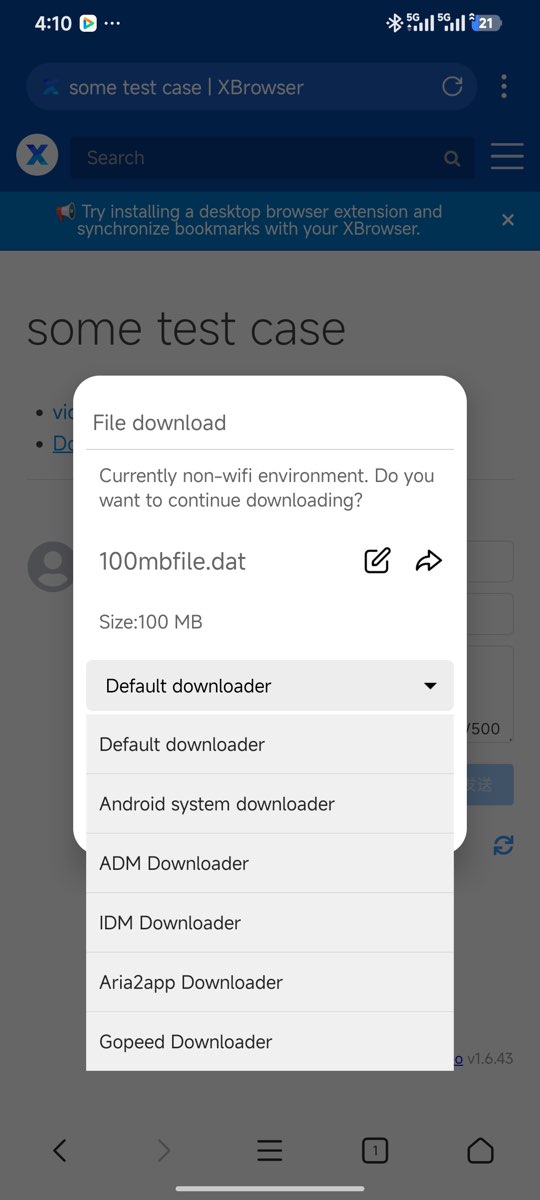
Simply click to select one of the downloaders, and the current download request will be handed over to that downloader for processing, enjoying the ultra-fast experience brought by multi-threaded downloads.
Method 2: Set Default Downloader
If you are already accustomed to using a particular third-party downloader, you can set it as the default downloader to avoid manual selection each time.
Setup Steps:
- Open X Browser, go to Settings > Basic Settings > Current Downloader
- Select your preferred downloader from the downloader list
- After setup is complete, all download requests will automatically be handled by that downloader
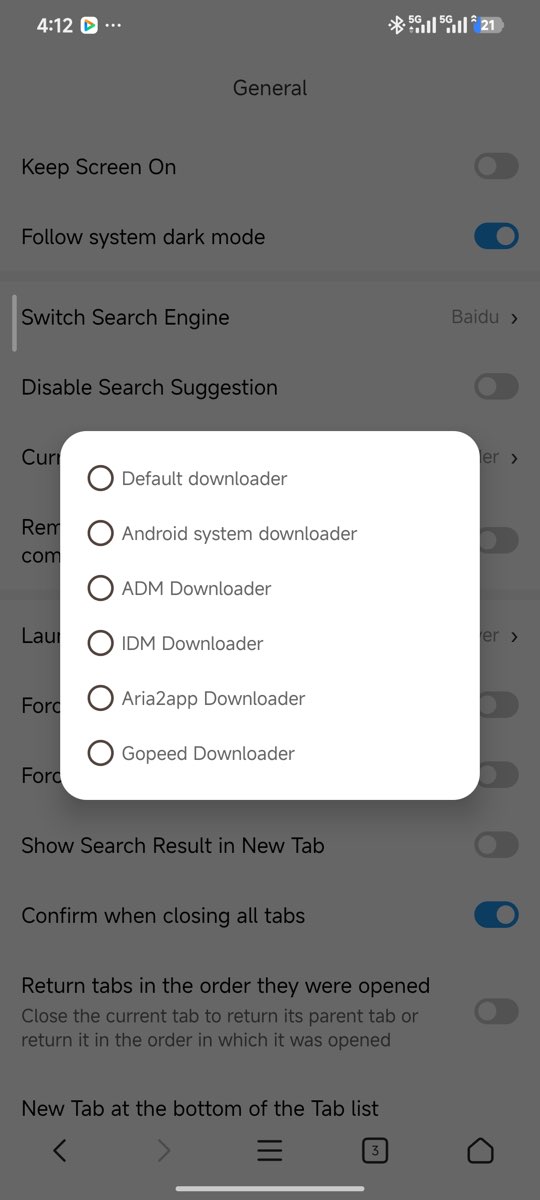
Supported Third-Party Downloader List
X Browser supports multiple mainstream third-party downloaders, covering various download scenarios such as multi-threaded downloads, BT torrent downloads, and M3U8 video downloads. Here is the complete support list:
Built-in System Downloader
- Android System Downloader - No installation required, comes with the system, can be bound directly
Recommended Professional Downloaders
1DM (Internet Download Manager) - Powerful multi-threaded download tool with resume support
- Package name:
idm.internet.download.manager
- Package name:
1DM Plus - Enhanced version of 1DM with richer features
- Package name:
idm.internet.download.manager.plus
- Package name:
ADM (Advanced Download Manager) - Advanced download manager supporting multi-threading and BT downloads
- Package name:
com.dv.adm
- Package name:
FDM (Free Download Manager) - Free and open-source download manager
- Package name:
org.freedownloadmanager.fdm
- Package name:
Aria2App - Download tool based on Aria2, supports multiple protocols
- Package name:
com.gianlu.aria2app
- Package name:
Xunlei - Well-known domestic download tool with fast BT download speeds
- Package name:
com.xunlei.downloadprovider
- Package name:
Gopeed - Next-generation open-source downloader with modern interface
- Package name:
com.gopeed.gopeed
- Package name:
Tip: If you have other useful downloaders that need X Browser support, feel free to let us know through feedback channels.
FAQ (Frequently Asked Questions)
1. Will my download history be lost after binding a third-party downloader?
No. Binding a third-party downloader will not affect the download history of X Browser’s built-in downloader. The download histories are managed independently.
2. Can I use multiple downloaders simultaneously?
Yes. You can temporarily select different downloaders for each download, or change the default downloader in settings at any time. Different downloaders are suitable for different download scenarios.
3. Why can’t I see the downloader in the list even though I installed it?
Please ensure:
- The downloader is correctly installed and can open normally
- The downloader is in the above support list
- Try restarting X Browser
- Check if the downloader’s package name is correct
4. Will using a third-party downloader be faster?
Yes. Professional downloaders usually support multi-threaded download technology, which can split files into multiple parts for simultaneous download, greatly improving download speed. The speed improvement is especially noticeable when downloading large files.
5. How to download BT torrent files?
After binding a third-party downloader that supports BT downloads (such as ADM or Xunlei), click on BT torrent links or magnet links, select the corresponding downloader, and the download will begin.
6. How to download M3U8 videos?
After finding the M3U8 video address using the video sniffing feature, select a downloader that supports M3U8 downloads (such as 1DM or ADM) to download. The downloader will automatically merge the segmented videos into a complete file.
Summary
By binding third-party downloaders, X Browser’s download functionality has been greatly enhanced. Whether it’s daily file downloads, large file multi-threaded downloads, BT torrent downloads, or M3U8 video downloads, you can find suitable solutions.
It’s recommended to choose 1-2 professional downloaders to install based on your needs:
- Daily Downloads: Recommended 1DM or ADM, user-friendly interface with comprehensive features
- BT Downloads: Recommended Xunlei or ADM, fast download speeds
- Video Downloads: Recommended 1DM or ADM, supports M3U8 and other video formats
- Open Source Enthusiasts: Recommended FDM or Gopeed, completely free and open source
Install your favorite downloader now and experience the thrill of ultra-fast downloads!