Want to download M3U8 videos from web pages and convert them to MP4 format? This article will detail how to use X Browser with third-party downloaders to easily achieve M3U8 video download and format conversion.
What is M3U8 Video?
M3U8 is a streaming video format widely used on major video websites and live streaming platforms. Unlike regular MP4 videos, M3U8 videos consist of multiple small segments and cannot be downloaded directly. However, through X Browser’s video sniffing feature combined with professional downloaders, you can easily download and automatically convert them to MP4 format.
Third-Party Downloaders Supporting M3U8 Downloads
X Browser supports the following three professional downloaders that can download and convert M3U8 videos:
- 1DM (Internet Download Manager) - Powerful features, supports multiple resolution downloads
- ADM (Advanced Download Manager) - Simple and fast
- Xunlei Downloader - Fast download speed, good stability
You only need to install one of these downloaders to complete M3U8 video download and conversion. For how to bind third-party downloaders, please refer to: How to Bind Third-Party Downloader.
TL;DR (Quick Start)
- Prerequisites: Install 1DM, ADM, or Xunlei downloader
- Core Steps: Enable video sniffing → Click download → Select resolution → Auto-convert to MP4
- Time Required: ~3 minutes for setup, download time varies by video size
- Key Feature: Automatic merging and MP4 conversion, no manual operation needed
M3U8 Video Download Steps
Step 1: Sniff M3U8 Video Address
First, use X Browser to open a webpage containing M3U8 video (you can also use this test video address for practice).
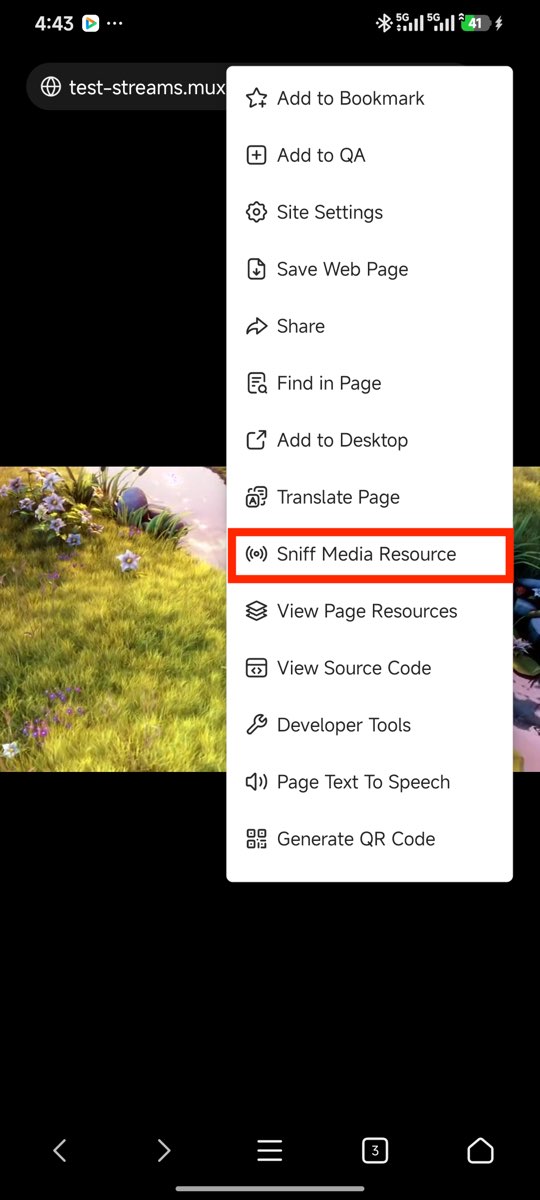
Then obtain the video address through the “Sniff Media Resources” option in the page tools menu.
Step 2: Click Download Button
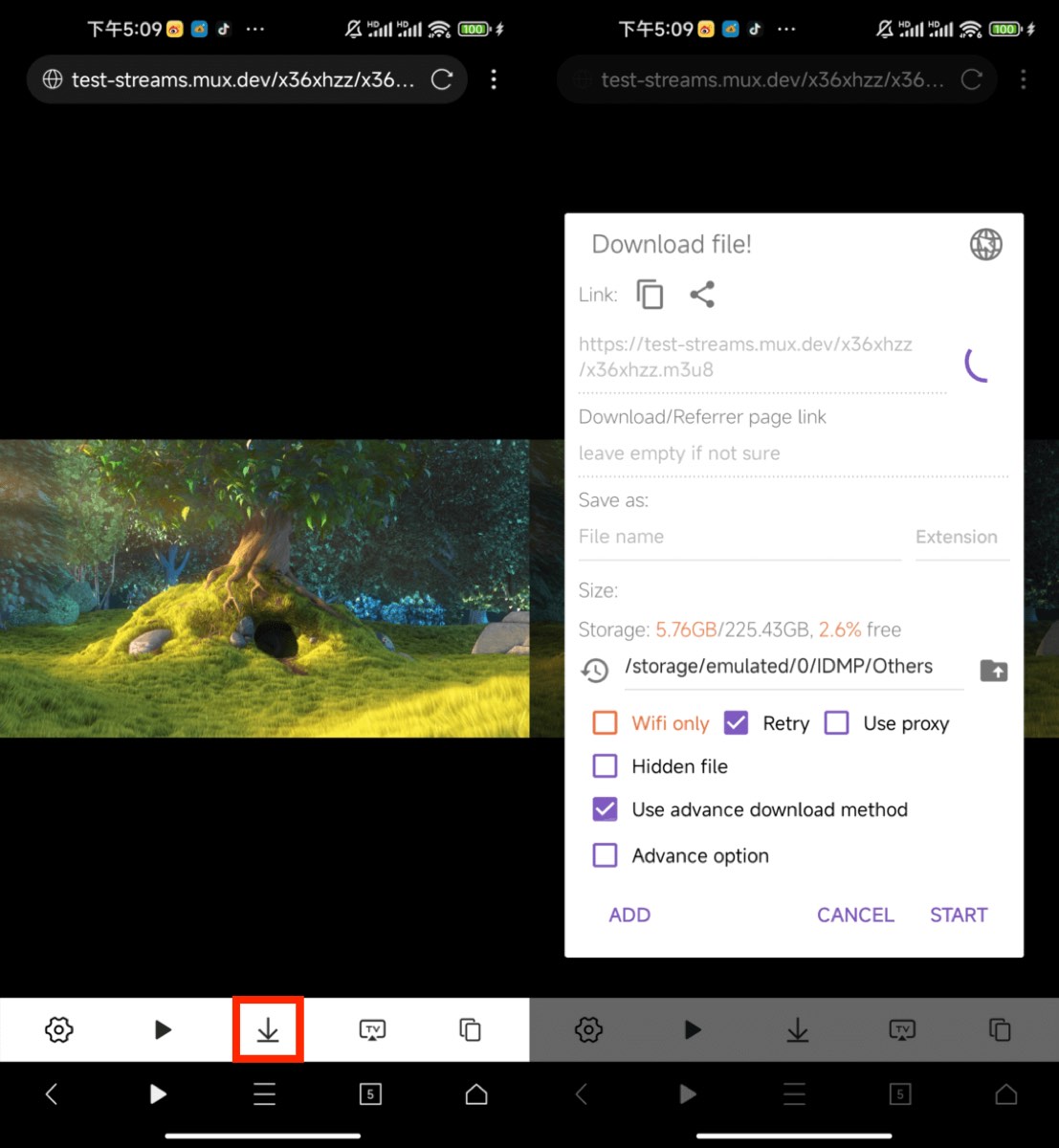
After successful sniffing, a video toolbar will pop up on the page, providing various video operation options. Click the “Download” button in the toolbar to start downloading.
Step 3: Select Video Resolution
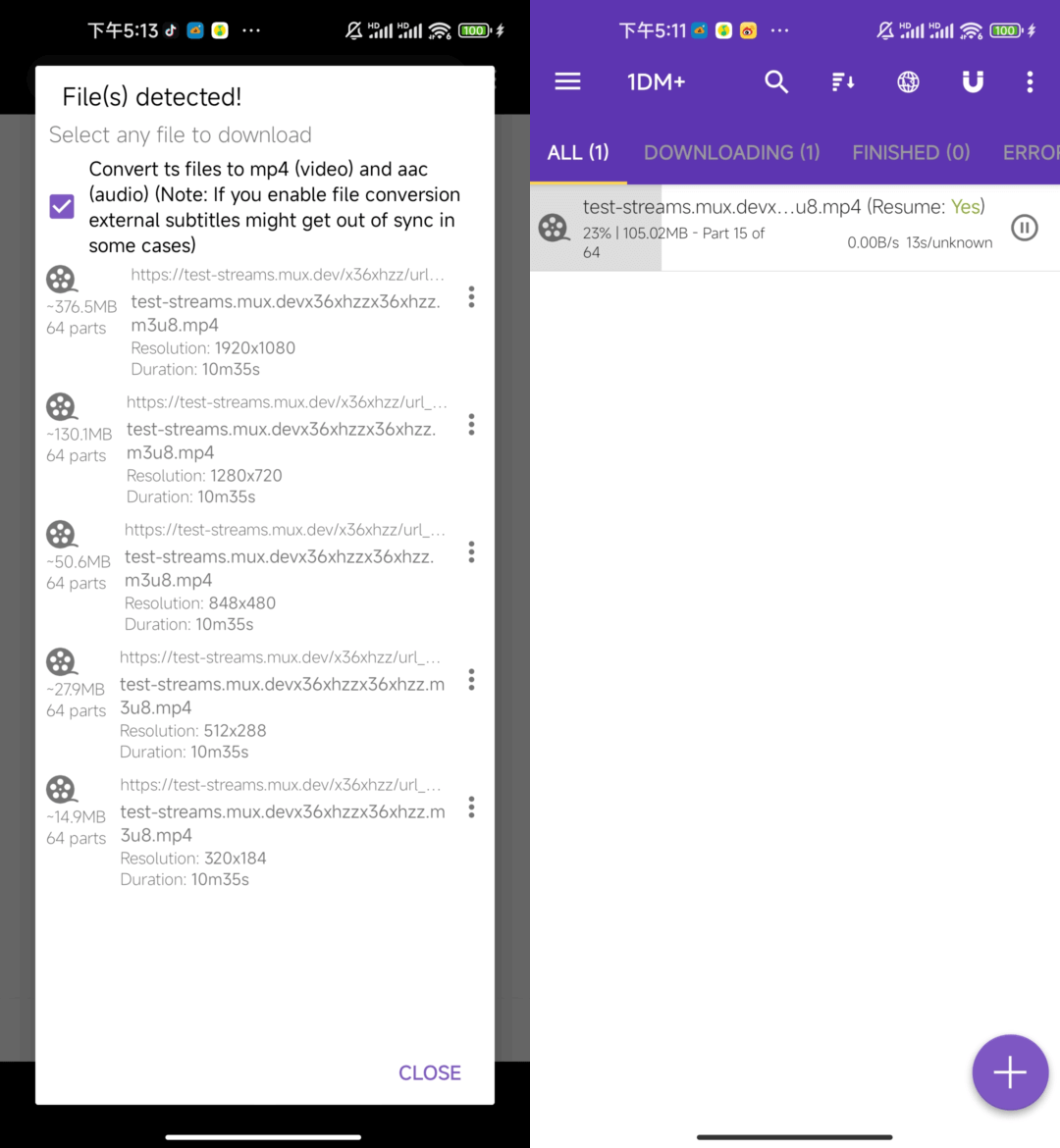
1DM downloader will automatically parse the M3U8 file and pop up a dialog listing available resolutions (such as 1080p, 720p, 480p, etc.). You can select the appropriate resolution for download according to your needs.
Step 4: Automatic Conversion to MP4
After download is complete, 1DM downloader will automatically merge M3U8 video segments and convert them to a complete MP4 file. The entire process is fully automatic without manual operation.
FAQ (Frequently Asked Questions)
1. Why can’t M3U8 videos be downloaded directly?
M3U8 is a streaming playlist format. It is essentially just an index file pointing to multiple video segments. Regular download tools cannot recognize and process this format; professional downloaders are needed to parse, download, and merge these segments.
2. What is the quality of downloaded MP4 videos?
The quality of downloaded videos depends on the resolution you select. Usually M3U8 videos provide multiple resolution options (such as 1080p, 720p, 480p), which you can choose according to your needs. Higher quality means larger file size.
3. Can other downloaders besides 1DM also automatically convert?
Yes. ADM and Xunlei downloaders also support automatic download and conversion of M3U8 videos, with basically the same operation process.
4. What to do if download speed is slow?
M3U8 video download speed depends on:
- Video source server speed
- Your network connection quality
- Number of video segments
It’s recommended to use a stable WiFi network and avoid downloading during peak hours.
5. Which websites’ M3U8 videos can be downloaded?
In theory, as long as the M3U8 address can be found through the video sniffing feature, it can be downloaded. This includes major video websites, live streaming platforms, online courses, etc. However, please comply with copyright laws and only download content you have the right to use.
Summary
Through X Browser’s video sniffing feature combined with professional downloaders (1DM, ADM, or Xunlei), you can easily download M3U8 videos from web pages and automatically convert them to MP4 format. The entire process is simple and convenient, without complex technical operations.
Recommended Combinations:
- Best Choice: X Browser + 1DM Downloader (most comprehensive features)
- Alternative: X Browser + ADM Downloader (simple and easy to use)
- Domestic Users: X Browser + Xunlei Downloader (fast download speed)
If you frequently need to download videos from web pages, this combination is highly recommended. Install the downloader now and start enjoying the convenient video download experience!