TL;DR (Quick Start)
- What you want to do: Sync X Browser bookmarks in desktop browsers.
- Easiest installation method: Prioritize installation from extension stores (Chrome / Edge / Firefox).
- Login required: Available after logging into your X Browser account.
This is an open-source browser extension designed specifically for X Browser. It runs on Chromium-based browsers and Firefox, supporting bidirectional synchronization between local and cloud bookmarks.
Features
Minimalist design, providing only the most basic bookmark sync functionality. Available after logging into your X Browser account. If you have multiple desktop browsers, you can also use the same X Browser account to sync bookmarks across multiple devices.
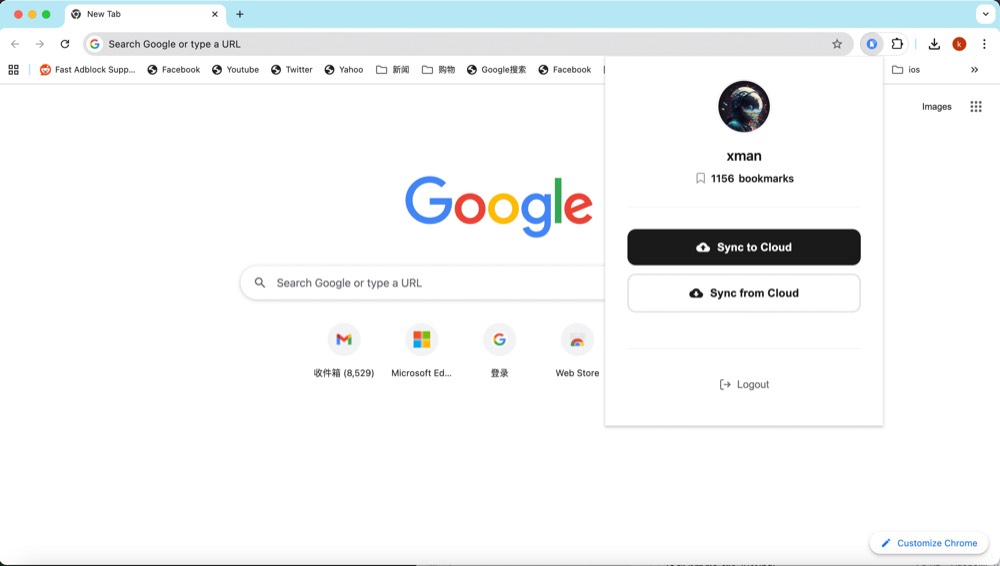
Browser Compatibility
✅ Chrome 88+
✅ Firefox 109+
✅ Microsoft Edge 88+
✅ Other Chromium-based browsers
Installation Instructions
Extension Store Installation
Chrome Web Store: https://chrome.google.com/webstore/detail/dbccejmmnkoaaffbliocemfkhabmemhe
Edge Add-ons: https://microsoftedge.microsoft.com/addons/detail/xbrowser-bookmark-sync/gdbkdcohpokcfaheiojfamnmfoniaeca
Firefox Add-ons: https://addons.mozilla.org/en-US/firefox/addon/xbrowser-bookmark-sync/
Install from CRX File
Download the xbrowser-bookmark-sync.crx file to your local directory.
Open Chrome browser and go to the extensions management page
- Method 1: Enter
chrome://extensions/in the address bar - Method 2: Menu → More Tools → Extensions
- Method 1: Enter
Enable “Developer mode” in the top right corner
Drag the CRX file from file manager to the extensions page to complete installation
Developer Mode Installation
Chrome/Edge Browsers:
- Download this project locally
git clone https://github.com/examplecode/xbrowser-bookmark-sync.git |
Or download the zip package xbrowser-bookmark-sync.zip and extract it to a local directory.
Open Chrome browser and go to the extensions management page
- Method 1: Enter
chrome://extensions/in the address bar - Method 2: Menu → More Tools → Extensions
- Method 1: Enter
Enable “Developer mode” in the top right corner
Click “Load unpacked”
Select the project folder
Extension installation complete, click the toolbar icon to use
Firefox Browser:
Install from zip package
Download the zip package xbrowser-bookmark-sync-firefox.zip
Then in Firefox:
- Enter
about:debugging#/runtime/this-firefoxin the address bar - Click “Load Temporary Add-on”
- Select the
xbrowser-bookmark-sync-firefox.zipfile you just downloaded
Install from source code
|
Then in Firefox:
- Enter
about:debugging#/runtime/this-firefoxin the address bar - Click “Load Temporary Add-on”
- Select the
manifest.jsonfile in the project directory
File Structure
├── manifest.json # Extension configuration file |
Permission Description
bookmarks: Read and modify browser bookmarksstorage: Store user login informationhost_permissions: Access cloud API
Development Notes
Debugging
- Click “Inspect views” on the extensions page to open developer tools
- View log information in the Console
- Click the refresh button to reload the extension after modifying code
FAQ (Troubleshooting)
- Can’t find extension icon after installation: Some browsers collapse extensions into the “Extensions/Puzzle” menu. You can pin the extension to the toolbar from that menu.
- No sync after login: Please confirm network is available and check for failed request logs in developer tools; if necessary, log out and log in again.
- Multi-device sync delay: Usually takes some time to complete cloud sync. It’s recommended to wait a moment or manually trigger a sync.
License
MIT License
Contact
For questions or suggestions, please contact X Browser technical support.